Atlas / tournament documentation
Spectators and observers
What anyone can follow on a tournament's public page, and how a spectator or observer gets into a room to watch a debate.
A spectator follows a tournament from outside it: a parent, a teammate, a league official or anyone with the link. Following the schedule and results needs no account. Watching a debate room needs an account and, for most rooms, the agreement of both teams.
The public page
Every public tournament has a page at its address, listed in the tournament directory, which lists the public tournaments of every league. The address ends in a short form of the tournament's name, on the league's own address, and an older link with the tournament's long id forwards to it. A private tournament is not listed. Its readable link opens only for an account that holds a role in it, and anyone else reaches it only by the link the director shares. The page shows what the tab room has published, and nothing more.
| Part | What it shows |
|---|---|
| Header | The tournament, its league, its dates and place, its events, the fee and description, when entries close, and links to Register an entry and Judge at this tournament while those are open. Times are on the tournament's clock with the zone named. A tournament that takes affiliated families only says so beside Register, as its directory card does. Register reads as open only when registration really is open. |
| Schedule | Each prelim's start time with the zone named, and No elimination rounds when the tournament plans no break. |
| Rounds | Each released round: rooms, sides and judges, with each entry's people and their school. Before release it reads that they appear when the tab room releases the draw. |
| Results | Decisions as each judge submits. A round set to Full shows each side's speaker points with the result; a round set to Winner only shows the winner alone until the break. |
| Standings | Once the first round's decisions are in, or at the break if the tournament publishes standings then. |
| Bracket | The elimination rounds, linked from the public page once the break is out. |
| Speaker awards | When published. The same list the Awards tab computes from the ballots, so a team's points are never credited to its first speaker alone. An event that ranks on ballots adds a Ballots column to the standings. |
Ballots and judge comments are never on the public page; competitors see their own on their page. Speaker points per round are public on a round set to Full, which is the default.
Competitors' names on the public page, the bracket, a room's page and the speaker awards follow the league's Names on public pages setting. By default each name shows as a first name and last initial, such as Maya R., and the rest of the surname is not sent to the browser at all. A league that chooses full names shows them in full. A tournament with no league uses the default. A competitor's own page, a coach's, a judge's and every admin screen show full names. When the tournament masks participant names on its postings, the public page shows entry codes such as LHS A instead.
Following an entry
- On the public page, select Follow an entry.
- Pick the student or team. Followed entries move to the top of the page with their current room and result, and are marked in the standings.
- The choice is kept in this browser only. It is never sent anywhere and shows nothing that is not already on the page, so it works without an account.
Watching a debate
Each released room has a room page. Who can open it depends on the round.
| The round | Who can watch | How |
|---|---|---|
| Spectating is on for the round | Any signed-in account | Open the room page and follow it. For an online round the meeting link still needs both teams: under Ask to join the meeting, say who you are and why, and select Ask both teams. |
| Spectating is off | An observer both teams approved | Open the room page. Under Ask to watch this round, say who you are and why, and select Ask both teams. You are let in when both agree. |
| Spectating is off, and you asked the tab room instead | An observer the tab room enrolled and both teams approved | The tab room logs the request on Observers and records each side's answer. See Observers. |
Your request reaches each team as a notice that someone asked to watch, linked to the room. The teams never see your email address: the room page shows the request as from Someone with a Meridian account, so say who you are in your reason. Asking again for the same room sends no second notice. The tab room can still see your address.
A visitor without an account who opens a room page is asked to sign in or create one, and comes straight back to the room afterwards. An observer watches: the room's chat and evidence are for the competitors, the judges and the tab room.
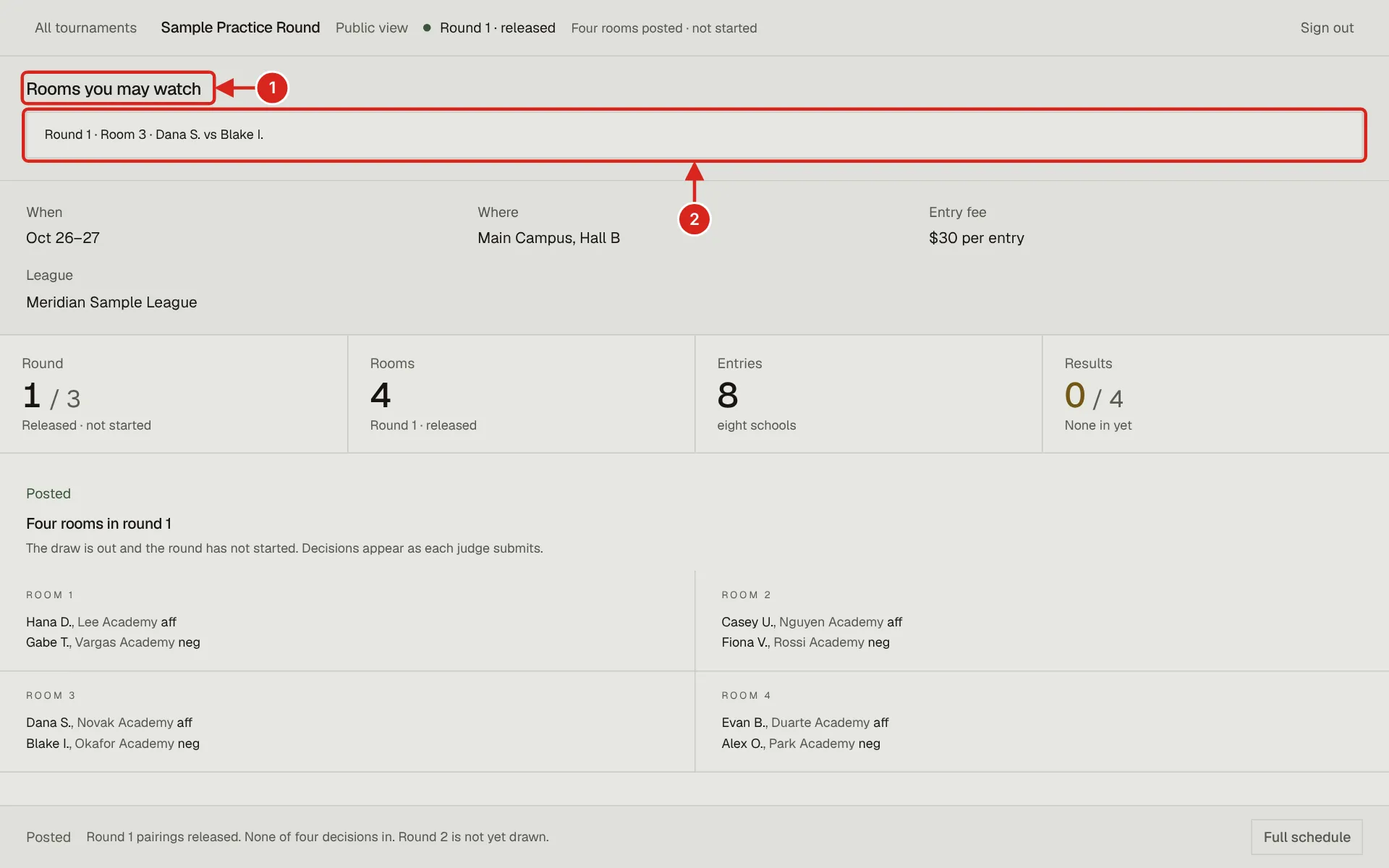
- 1. Rooms you may watch appears at the top of the tournament page once you are approved for a room. It is only shown to you.
- 2. Each approved room links to its room page, which is read only for an observer. Live rooms come first; a finished one is marked Finished.
If you cannot get in
| What you see | What it means |
|---|---|
| Room unavailable | The round is not released yet, the link expired, or the room moved. Go back to the tournament page for the current rooms. |
| You are not competing in or judging this round, and it is not open to spectators. | Ask both teams with the form on the page. |
| This round is open to follow here, but its meeting link goes only to the debaters, the judges and observers both teams approve. | You can follow the room page; ask to join the meeting for the video link. |